Logto product update: Cloud collaboration, direct sign-in, lazy password migration, and more
Use Logto as an OpenID Connect identity provider to build your app ecosystem; add authentication with two inputs with Protected App; and new guides for Blazor, SvelteKit, Nuxt.js, Expo (React Native), and Angular.
GaoFounder
Stop wasting weeks on user auth
Launch secure apps faster with Logto. Integrate user auth in minutes, and focus on your core product.
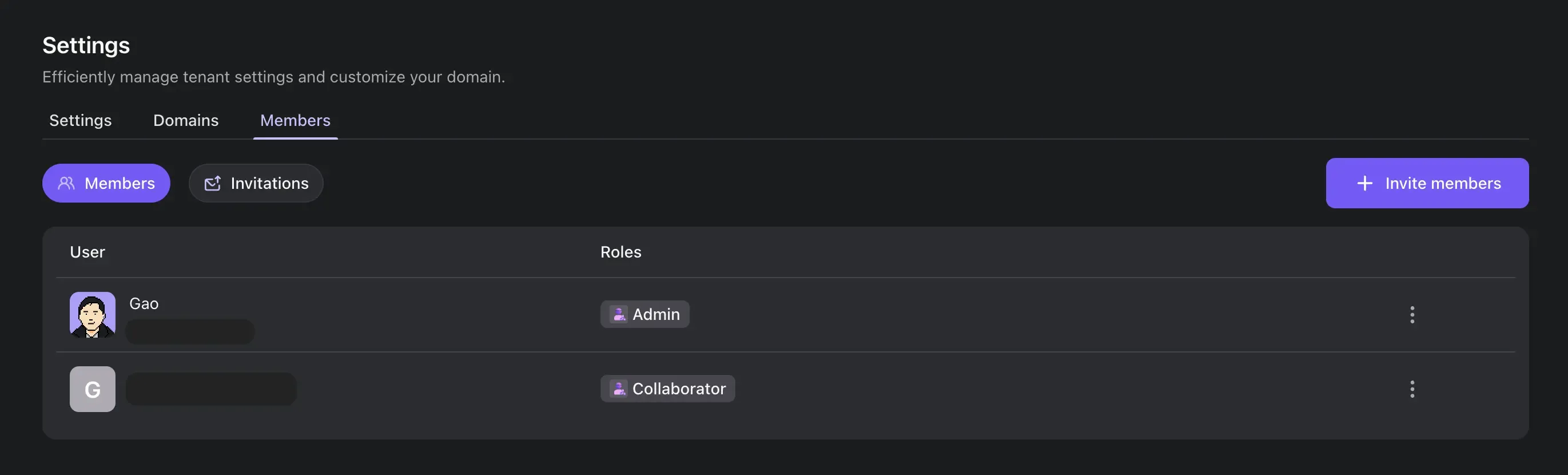
The long-awaited feature is finally here! You can now invite your team members to your Logto tenants. Collaborate with your team members to manage your applications, users, and other resources.
Invite your team members by following these steps:
Go to your tenant settings (The "Settings" tab).
Click on the "Members" tab.
Click on the "Invite members" button.
Fill in the email address of the team member you want to invite, and choose the role you want to assign to them:
Admin: Full access and management of all tenant resources.
Collaborator: Can manage identity-related resources, but with limitations:
You can now directly invoke a sign-in method by skipping the first screen. This is useful when you have a direct link to a sign-in method, for instance, when you have a "Sign in with Google" button on your website.
To use this feature, you need to pass the direct_sign_in parameter to the authentication request. It supports the following methods:
Sign-in experience can be initiated with a specific screen by setting the first_screen parameter in the OIDC authentication request. This parameter is intended to replace the interaction_mode parameter, which is now deprecated.
See the First screen documentation for more information.
We have added support for the remaining OpenID Connect standard claims. Now, these claims are accessible in both ID tokens and the response from the /me endpoint.
Additionally, we adhere to the standard scopes - claims mapping. This means that you can retrieve most of the profile claims using the profile scope, and the address claim can be obtained by using the address scope.
For all newly introduced claims, we store them in the user.profile field.
In addition to the claims that Logto recognizes, all social connectors now also store the raw data returned by the social provider in the rawData field.
To access this data in a user object, you can use the user.identities.[idp-name].details.rawData field.
When migrating users from a legacy system to Logto, you can now use the passwordAlgorithm and passwordDigest fields in the POST /users API to store the user's original password hash.
Currently supported algorithms are:
Bcrypt
MD5
SHA1
SHA256
Argon2i
When the user logs in, Logto will use the provided algorithm and digest to verify the password; if the verification succeeds, Logto will automatically migrate the password to the new Argon2 hash.
Support avatar and customData fields in the POST /users API.
Support signing key rotation in Logto OSS Console.
Carry over search params to the authentication request in the live preview (demo app).
When entering the Logto demo app with search parameters, if the user is not authenticated, the search parameters are now carried over to the authentication request. This allows manual testing of the OIDC authentication flow with specific parameters.
GET /organization-roles can now be called with the q query parameter to filter the results by the role id, name, or description.